


Progressive
4.639.05K Reviews
App Specs
- Version
- 3.145
- Updated On
- License
- Free
- Downloads
- 10,000,000+
- Developer
- Progressive Insurance
- Categories
- Finance
- Platform
- Android, iOS
Screenshots
 Analysis by AppCompare
I find Progressive most useful when insurance is something I need to handle in the middle of an ordinary day, not just during a call with an agent. I might want to check a policy before lending someone my car, pull up an ID card at a roadside stop, or see what is happening with a claim. Having those tasks on a phone can save time, though it works best as a convenient account tool rather than a replacement for understanding the details of your coverage.
Start with the policy you already have
The app is a finance tool from Progressive Insurance, so its clearest fit is for people who already have a relationship with the company or are considering getting one. It is free, rated for Everyone, and the current version is 3.134. Progressive has been offering the app since April 20, 2010, and its scale is reassuring: it has more than 10 million installs, with an average rating of 4.6 from around 230,000 ratings. Those figures suggest broad use, but they are not a promise that every policy task will feel equally smooth on every device.
If you are comparing insurance, I would begin with the policy itself rather than assuming the app can tell you whether a plan is right for you. The useful question is not simply whether you can see a card or make a payment; it is whether the coverages, limits, deductibles, and circumstances suit your household and vehicle. The app can make account details easier to reach, but I would still read the policy documents and ask a person when a coverage term is unclear.
From quick check to completed task
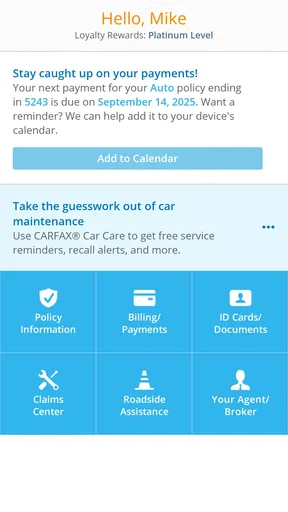
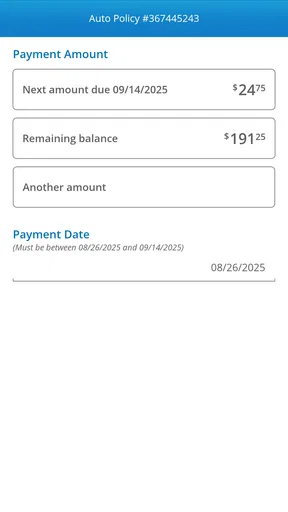
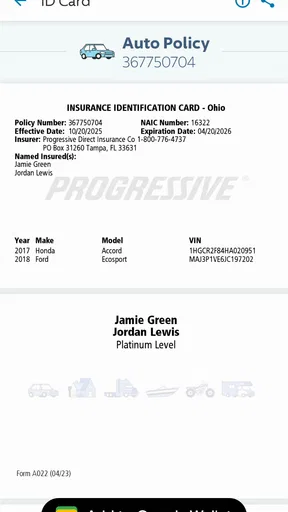
Once signed in, the practical flow is simple: open the relevant policy, check the information you need, and choose the available action. For a routine payment, that can be more direct than searching through email or waiting until you are at a computer. For a proof-of-insurance request, having the ID card on the phone is a small but meaningful convenience. I would check that the card is current before relying on it, especially after a policy change or renewal, rather than discovering a problem when someone asks for it.
Claims are a different kind of task. Reporting an incident through the app can give you a place to start, while tracking helps you see updates and any next steps. That does not make the underlying process instant: a claim may involve questions, documents, inspection, or communication beyond the screen. I see the app as a useful status window and organizer, not a shortcut around the decisions and follow-up a claim can require. Keeping photos, dates, and other relevant details together before beginning can make the first report clearer.
Where convenience meets real life
A realistic example is a driver who is asked for proof of insurance after a minor parking-lot incident. Instead of hunting for a paper card in the glove compartment, they can try to retrieve the ID card on their phone, then use the same account to find policy information or begin a claim if needed. Later, notifications can help them notice an update without repeatedly calling just to ask whether anything has changed. That is a sensible handoff from a quick self-service task to a more involved conversation when the situation needs it.
Still, I would not make the app the only place I know how to reach help. If a phone is lost, its battery is dead, or a login problem appears at an inconvenient moment, a digital card is less useful. I would keep another route to the policy information available and know how to contact the insurer outside the app. Notifications are helpful prompts, but I would open the claim itself to understand what action is requested rather than treating a notification preview as the full explanation.
Worth Reading Before You Choose

EA SPORTS FC Mobile 26 Is a Bigger Football Game, but It Takes Time

Flipboard Shows What News Apps Must Do Beyond the Feed

Switching to Android Auto Means Rethinking Your Driving Routine

Google Calendar Makes a Crowded Week Easier to Manage

Ludo King Makes the Most of the Minutes Between Plans

Baby Panda World Brings Quick Play to Modern Phones, but Its Game Library Feels Busy
Getting Started with Ease
First things first, downloading the Progressive app is a snap. Available on both Android and iOS, it's just a quick search away in your app store. Once downloaded, the setup is straightforward. I found myself logged in and exploring its features in no time. It’s user-friendly and designed with a clean, intuitive interface that even the least tech-savvy among us can navigate with ease.
Features That Matter
What I love about this app is how it puts all your insurance needs in one place. You can view your policy details, make payments, and even report claims directly through the app. Need your insurance ID card? No problem! You can access it anytime, anywhere, which is super handy when you're on the go. I find the ability to view and manage my policy at a glance really convenient.
Another standout feature is the app's claims tracking. If you’ve ever been through the hassle of filing a claim, you’ll appreciate how the app keeps you updated every step of the way. It sends notifications about the status of your claim and any actions you need to take. Honestly, it makes the whole process less daunting.
Staying Safe and Connected
In a world where data security is paramount, the app doesn’t disappoint. With secure login options, including biometric authentication, your personal information stays safe. I always feel reassured knowing my data is protected. Plus, their customer service is just a tap away if you ever need assistance. The in-app chat feature is particularly useful for quick questions or support.
For those who love saving, the app also offers ways to access discounts and savings. You can get tips on how to lower your premiums, which is a great incentive to stay engaged with your policy details.
Choosing the right route for a question
I would use the in-app chat for a focused question that can be explained in a few sentences, such as asking where to find a policy detail or what a displayed status means. For a complicated coverage decision or a claim with several moving parts, a direct conversation may be better: short messages can be convenient, but they are not always the easiest way to describe a sequence of events or weigh options. Keep the policy number and relevant dates nearby before contacting support so you can move from the app to a person without having to reconstruct the basics.
That distinction matters when comparing this with the usual alternatives. A website can be more comfortable for reading longer documents and comparing several coverage details side by side, while a phone call can be better when you need a nuanced explanation. The app wins on quick access to account tasks—especially a card, payment, or claim update—but I would not treat the mobile screen as the best place for every insurance decision. Use each channel for what it does well rather than forcing one to handle everything.
Who will get the most from it
I think it suits existing Progressive customers who want routine policy tasks close at hand, especially drivers who travel, share a vehicle, or dislike keeping paper documents organized. It can also help someone who has already filed a claim and wants an easier way to check for updates. The strongest benefit is not a dramatic new insurance feature; it is reducing the small bits of friction that otherwise send you searching through folders, inboxes, or a desktop login.
On the other hand, someone who prefers not to manage financial or insurance accounts on a phone may be happier using a website or speaking with a representative. It is also not the right basis for choosing a policy if you have not compared coverage and costs carefully. And if you have a policy with another insurer, this app is not a general insurance organizer: its value is tied to Progressive. I would install it when I expect to use those account tools, not just because an insurer’s app sounds useful in theory.
Small habits that make the workflow better
One practical habit is to sign in and locate the ID card before you need it. That gives you time to resolve an account-access issue at home instead of under pressure. Another is to review policy details after a change and make sure the information you expect to use is visible. For a claim, jotting down the basic timeline and gathering relevant photos before starting can make the report more coherent; it also gives you a reference if you later speak with a representative.
I would also treat savings tips as prompts to review your situation, not as proof that a particular discount applies or that a premium will fall. Insurance pricing depends on the policy and the circumstances, so check the terms that actually apply to your account before changing coverage to chase a lower bill. Convenience should help you ask better questions, not encourage you to accept a change you do not understand.
Where the flow can break
The main limitation is that an app can display and organize information, but it cannot remove the complexity of insurance. A claim can require details and follow-up that are hard to handle in a quick session, and an alert may tell you to act without giving enough context to decide what that action means. I would open the relevant claim or contact support rather than guessing from a brief message. For urgent situations, do not assume that an app notification or chat is a substitute for the appropriate immediate help.
There is also an everyday trade-off in relying on a phone for documents: access depends on being able to use the device and sign in. Biometric login is convenient when available, but I would still make sure I can recover access if it fails. That is not a reason to avoid the app; it is a reason to keep a backup way to reach your account and to avoid waiting until a roadside request or payment deadline to test the basics.
Its minimum operating-system requirement is version 8.0, which is useful to check if you are setting it up on an older device. The app has around 35,000 written reviews, giving prospective users a substantial body of feedback to consult alongside its rating. I would read recent comments for patterns that matter to my own phone and needs, rather than assuming a high average guarantees a flawless experience. A finance app is most valuable when it is dependable for the few tasks you actually use.
How I would use it day to day
My routine would be light: confirm that I can sign in, find the current ID card, and use the policy view when I need to check a detail. I would make a payment in the app when that is the simplest route, then keep an eye on any confirmation rather than assuming that tapping a button alone settles the task. If I had a claim, I would use the reporting and tracking tools to stay organized, while keeping notes and using customer support when a decision or explanation needed more than a status update.
That approach keeps the app in its strongest role: a practical companion to an insurance policy, not the policy itself and not a substitute for careful comparison. Progressive’s app can make familiar account chores easier to start and follow, while the insurer’s broader support remains important when the circumstances are unusual. I would recommend it to a Progressive customer who values quick access and is comfortable handling routine tasks on a phone; I would steer someone seeking an independent, all-insurer policy manager toward a different option.
Wrapping It Up
Overall, the Progressive app is a must-have for anyone looking to streamline their insurance management. It’s convenient, efficient, and packed with features that genuinely add value. Whether you’re tech-savvy or not, this app simplifies the complex world of insurance, making it more accessible and less intimidating. So, if you haven’t already, give it a try and see how it can make your life a little bit easier.
Pros
- User-friendly interface with intuitive navigation.
- Seamless integration with various platforms.
- Highly customizable settings for personalization.
- Efficient performance with minimal lag.
- Robust security features to protect data.
Cons
- Limited offline functionality.
- Occasional bugs in latest updates.
- Requires high storage space.
- Not available in all regions.
- In-app purchases can be costly.
FAQs for Progressive
What is Progressive, and what does it offer?
Progressive is a productivity app designed to help users streamline their daily tasks and routines. It offers features like task management, calendar integration, and customizable reminders. The app aims to enhance productivity by providing tools to prioritize tasks and track progress efficiently. It’s available on both Android and iOS platforms.
Is Progressive free to use, or does it require a subscription?
Progressive offers a free version with basic functionalities, allowing users to manage tasks and set reminders. For advanced features such as collaborative tools, detailed analytics, and premium support, a subscription is required. Users can choose from monthly or annual plans, providing flexibility based on their needs.
What are the main features of Progressive?
Progressive includes features like task creation and categorization, calendar syncing, and smart reminders. It also offers project management tools, collaboration options for teams, and progress tracking with detailed insights. The app is designed to adapt to both personal and professional use, with customization options to fit individual needs.
How user-friendly is Progressive for beginners?
Progressive is designed with user-friendliness in mind, offering an intuitive interface that is easy to navigate. Beginners can quickly get started with basic tutorials and helpful tips embedded within the app. The app’s design focuses on simplicity without compromising on the depth of features available for more advanced users.
Can Progressive be used offline?
Yes, Progressive can be used offline to manage tasks and access certain features. However, syncing with calendars or collaborating with team members requires an internet connection. Any changes made offline will automatically update once the device reconnects to the internet, ensuring seamless functionality.


